Games
Create a new Game
To create a new Game click '+ New Game' in the right upper corner.
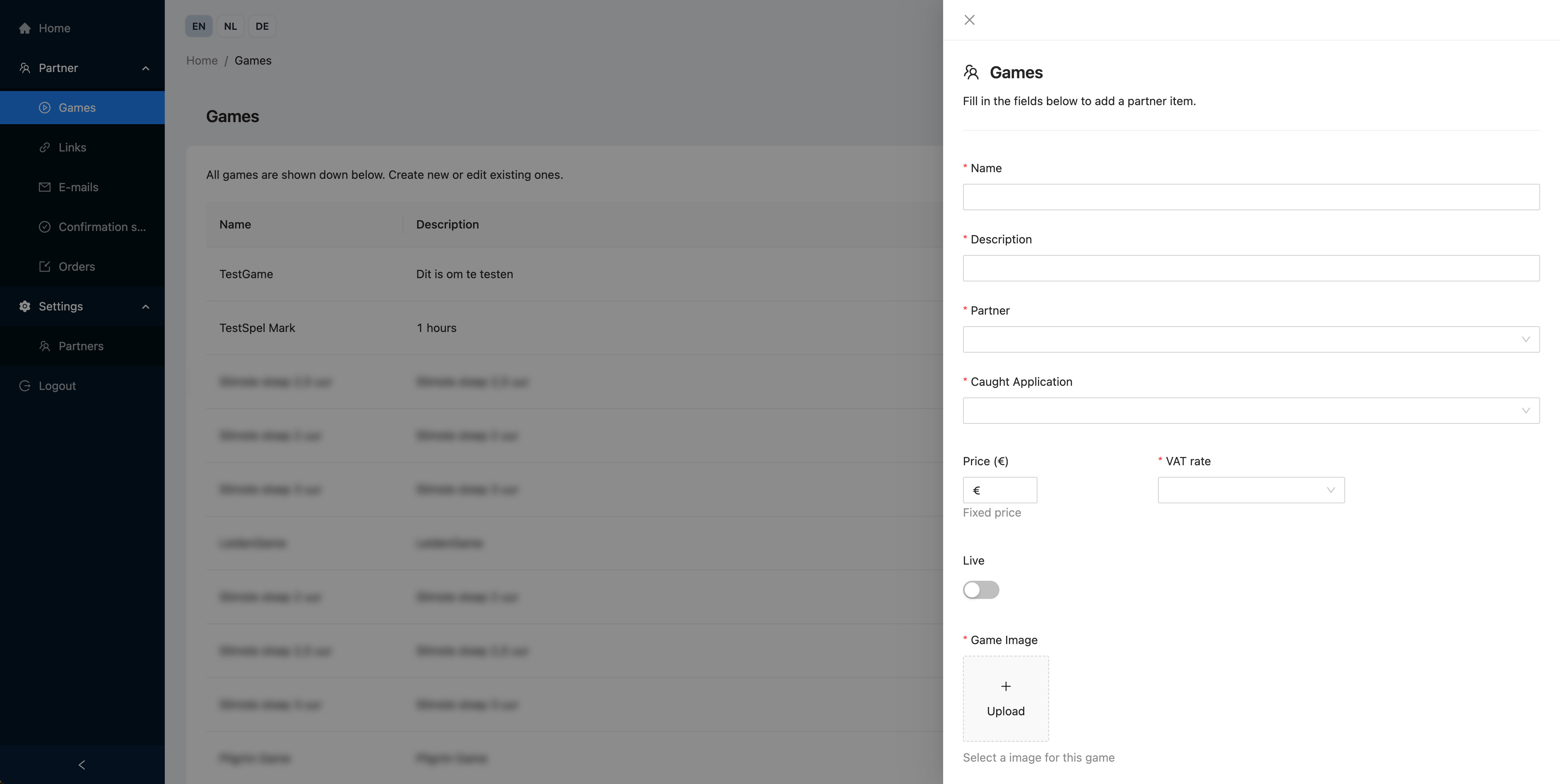
On a Game you can specify the following fields.
Game details
Name
The name of the offered game. Visible for the customer.
Description
The description of the offered game. Visible for the customer.
Partner
To which Partner does the Game belong? If the Partner shop for this Partner is activ, the Game can be displayed in that Partners' Shop.
Caught Application
Select the Caught Application for your Game.
Caught Location
After selecting the Application above, you must select the Caught Location for your Game.
Price
For what price is the game being sold to customers in your Partner shop or Link.
This is either a price per participating Team/Player or a total price for all participating Teams/Players. Read more
VAT rate
What VAT rate is applied. The selected rate determines if the price is including or excluding VAT.
Live
Is the Game available in the Partner Shop / Link.
Available options:
- Live - The Game is available and payments are handled using real transactions. Purchases are counted as usage an invoiced by Caught (costing actual money!)
- Test - The Game is available and payments are handles using test transactions. Purchases are not counted as usage by Caught.
- Not live - The Game is not accessible and therefore does not show in the Partner shop or Links.
Game Image
An image that is displayed with the Game in the Partner Shop or Link.
Game Settings
Group Mode
Matches the setting 'Teams / Individual use?' when manually creating a Group in the Caught Platform.
- Teams - Multiple people play together in a team.
- Individual - Each user, uses the app individually
- Main - Like teams, but with teams with one main device and the possibility to add one or multiple support devices.
Validity
Matches the setting 'Validity' when manually creating a Group in the Caught Platform.
- Up to and including selected date A a group is available for users and hosts up to and including the selected date (after this date, the group is no longer available).
- One time only, up to and including selected date A group is only available once for users and hosts up to and including the selected date (after this date, the group is no longer available). The group will expire a day after the first team is created.
Customer selects team/player count
Determines if the customer purchases a fixed number of Teams/Players or if the Customer can determine how many Teams/Players to purchase. Read details below.
Team Count
If 'Customer selects team/player count' is not checked, defines the number of Teams/Players the customer purchases for the specified price.
The Price is a total price for the number of Teams/Players specified here. No more Teams/Players can join the game than specified here.
Max. Team/Player Count
If 'Customer selects team/player count' is checked, defines the maximum number of Teams/Players the customer can order.
The specified Price holds per Team/Player. The number of Teams/Players that can use, is limited to the amount the customer orders.